Linux on Android on OnePlus Pad 3 Snap Dragon 8 Elite
-
david

- Site Admin
- Posts: 422
- Joined: Sat May 21, 2016 7:50 pm
Linux on Android on OnePlus Pad 3 Snap Dragon 8 Elite
Here i will test different ways of running Linux on Android 16 on OnePlus Pad 3 with Snap Dragon 8 Elite CPU!
Join our telegram group if you wana chat or have specific questions:
https://t.me/+h2K5CX5jEZA0MWJk

Let start with device tech specs:
Chipset Qualcomm SM8750-AB Snapdragon 8 Elite (3 nm)
CPU: Octa-core (2x4.32 GHz Oryon V2 Phoenix L + 6x3.53 GHz Oryon V2 Phoenix M)
GPU: Adreno 830
Ram: 12 or 16 GB
Internal Storige: 256GB or 512GB
Screen: 13.2 in (335.28 mm) 2400x3392 (314 PPI) IPS LCD (max. 144 Hz)

This device is one of the best candidate for running Linux on Andorod thx to its powerful specs!
And let get deep now shall we ?
Here is full specs of the SOC:

Good news is this device is started to be supported in LineageOS so we can install OpenSource andorid on it:
https://wiki.lineageos.org/devices/erhai/variant2/
And here is on what we are going to do our tests:

By default we can`t just use Linux kvm with qemu on android cos kvm is been disabled by device firmware even we use custom kernel and enable it! This type of limitation is on most android devices.
youtu.be/YSDDoWiqqok
Join our telegram group if you wana chat or have specific questions:
https://t.me/+h2K5CX5jEZA0MWJk
Let start with device tech specs:
Chipset Qualcomm SM8750-AB Snapdragon 8 Elite (3 nm)
CPU: Octa-core (2x4.32 GHz Oryon V2 Phoenix L + 6x3.53 GHz Oryon V2 Phoenix M)
GPU: Adreno 830
Ram: 12 or 16 GB
Internal Storige: 256GB or 512GB
Screen: 13.2 in (335.28 mm) 2400x3392 (314 PPI) IPS LCD (max. 144 Hz)
This device is one of the best candidate for running Linux on Andorod thx to its powerful specs!
And let get deep now shall we ?
Here is full specs of the SOC:
Good news is this device is started to be supported in LineageOS so we can install OpenSource andorid on it:
https://wiki.lineageos.org/devices/erhai/variant2/
And here is on what we are going to do our tests:
By default we can`t just use Linux kvm with qemu on android cos kvm is been disabled by device firmware even we use custom kernel and enable it! This type of limitation is on most android devices.
youtu.be/YSDDoWiqqok
-
david
- Site Admin
- Posts: 422
- Joined: Sat May 21, 2016 7:50 pm
Re: Linux on Android on OnePlus Pad 3 Snap Dragon 8 Elite
So 1st solution here is software called Termux. https://github.com/termux/termux-app#github
Termux is something like package manager and terminal for installing linux packages on Android.
Software support 3 different modes:
First one is Native mode in this mode Linux packages are been recompiled with android libs to run like native android apps:
Apps need to be recompiled cos there is difference between Linux and Android:
On a normal Linux distro (Debian, Void, etc.):
libc = glibc or musl
Kernel ABI = Linux
Syscalls + POSIX behavior expected by Linux
On Android / Termux:
libc = bionic
Kernel = Linux (yes)
Userland ABI = Android, not GNU/Linux
Even though the kernel is Linux, the userland ABI is different!
What about sound , 3d graphics and X11 how this is been done on android ?
Well most linux apps use OpenGL and Native android drivers support Vulkan and OpenGL-ES so in order this to work we use something like translation layer between Linux apps that need to use OpenGL and android native Vulkan API.
Depending on your specific GPU in our case Adreno 830 we can use different layers of translation:
Here is what our GPU support on Android:

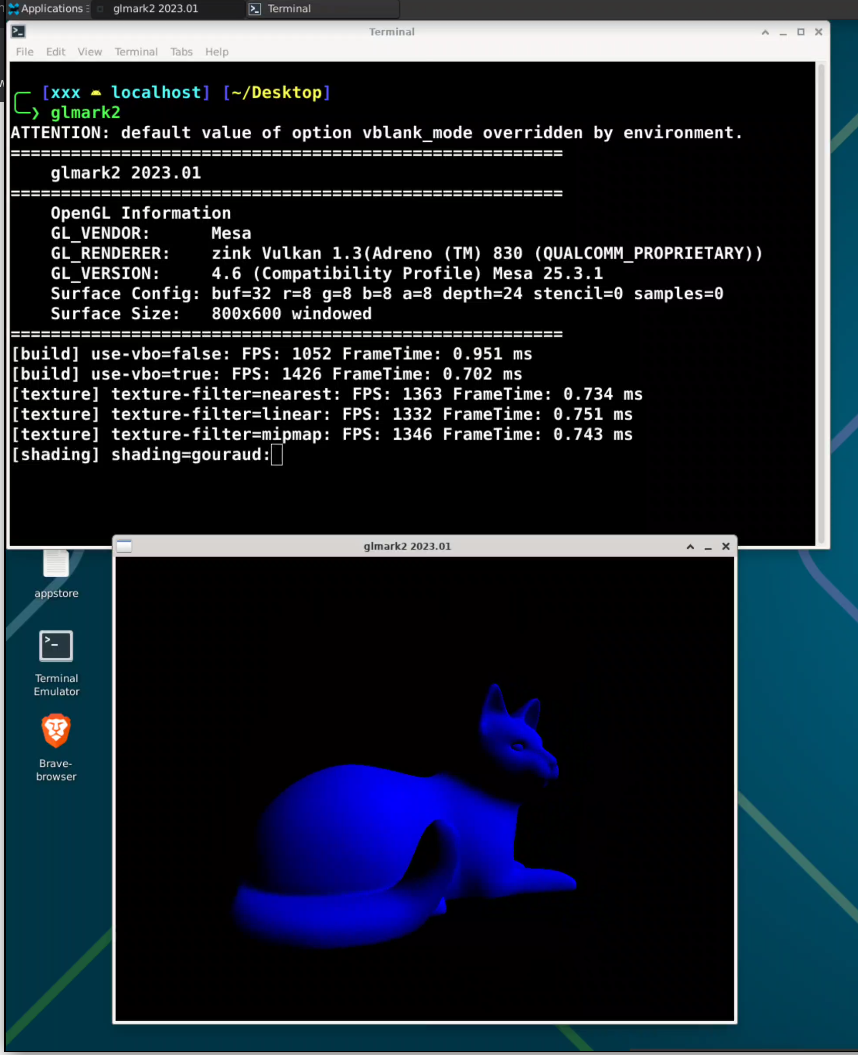
Turnip Mesa drivers built for Android are specialy made to support Snap Dragon Adreno GPU`s and can get OpenGL 4.6 inside our linux on Android !
For Sound to work we use another helper app called Termux API https://github.com/termux/termux-api


And in order to get X11 desktop there is again other helper app called termux-x11https://github.com/termux/termux-x11

So basically we can set our custom resolution on our virtual Monitor!
Termux is something like package manager and terminal for installing linux packages on Android.
Software support 3 different modes:
First one is Native mode in this mode Linux packages are been recompiled with android libs to run like native android apps:
Apps need to be recompiled cos there is difference between Linux and Android:
On a normal Linux distro (Debian, Void, etc.):
libc = glibc or musl
Kernel ABI = Linux
Syscalls + POSIX behavior expected by Linux
On Android / Termux:
libc = bionic
Kernel = Linux (yes)
Userland ABI = Android, not GNU/Linux
Even though the kernel is Linux, the userland ABI is different!
What about sound , 3d graphics and X11 how this is been done on android ?
Well most linux apps use OpenGL and Native android drivers support Vulkan and OpenGL-ES so in order this to work we use something like translation layer between Linux apps that need to use OpenGL and android native Vulkan API.
Depending on your specific GPU in our case Adreno 830 we can use different layers of translation:
Here is what our GPU support on Android:
Turnip Mesa drivers built for Android are specialy made to support Snap Dragon Adreno GPU`s and can get OpenGL 4.6 inside our linux on Android !
For Sound to work we use another helper app called Termux API https://github.com/termux/termux-api
And in order to get X11 desktop there is again other helper app called termux-x11https://github.com/termux/termux-x11
So basically we can set our custom resolution on our virtual Monitor!